AutoAE Alternatives (2026): 5 Ways to Make Professional Motion Graphics

After Effects, DaVinci Resolve, CapCut, Jitter and Remotion can all make Motion Graphics. Their core workflows begin with a project, canvas, timeline or codebase. Even when presets or templates are available, the user still has to build or direct the final Motion Graphics.
AutoAE begins at the other end of the process. Its Motion Graphics are already professionally designed. Users choose a visual model, replace the content and render it. They use Motion Graphics instead of first learning how to design and build them.
Is there a free AutoAE alternative?
Several tools have a free route, but free software does not remove the design work. DaVinci Resolve has a free version. CapCut Desktop can be downloaded free. Jitter has a Free plan, and Remotion is free for eligible individuals and small teams under its license.
Those products can reduce software cost, but the user still has to design, animate, edit or code the result. AutoAE Free tests a different workflow: choose a professionally designed visual model, replace the supported content, render the Motion Graphics and use the export directly or in any video editor.
AutoAE currently includes 500 one-time Credits on its Free plan, enough for five 720p downloads from the free-template library. Free exports include an AutoAE watermark and are limited to non-commercial personal use. These terms were checked on September 10, 2026 and may change.
AutoAE alternatives at a glance
This comparison separates software capability from production effort. The important difference is what you receive at the start and what you still need to create.
| Path | What you start with | What you still do | Where AutoAE differs |
|---|---|---|---|
| AutoAE | A completed professional visual model | Replace content, choose supported brand inputs and render | The Motion Design is already built |
| After Effects | An empty composition and professional authoring tools | Design, animate, composite and manage the project | The complete Motion Design is ready to use |
| DaVinci Resolve / Fusion | A timeline and node-based VFX workspace | Build the motion, then edit and finish the video | Professional motion arrives ready to customize |
| CapCut | A timeline with editing tools, effects and presets | Assemble the video and create or adapt its motion | AutoAE supplies the finished Motion Graphics layer |
| Jitter | A browser canvas and motion controls | Design the scene, direct the motion and refine it | The scene is already professionally designed |
| Remotion | A React project and programmatic video tools | Design, code, test, render and maintain the system | The user applies professional designs instead of engineering them |
On smaller screens, scroll horizontally to read the full comparison.
What AutoAE does differently
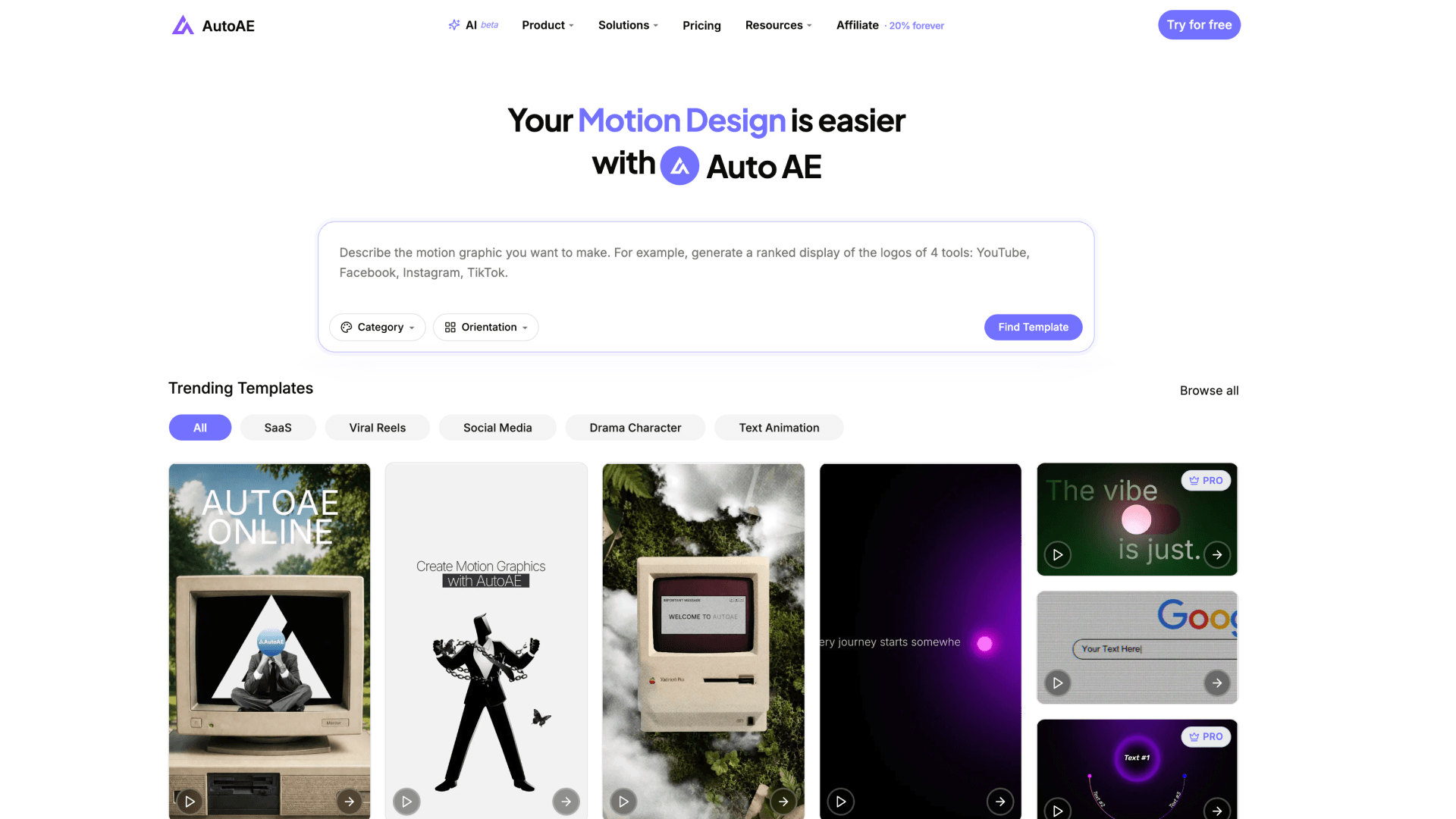 AutoAE homepage and Motion Graphics library
AutoAE starts where most alternatives are still asking the user to design. Its visual models already contain the composition, typography, pacing, transitions, UI interaction, product mockups and layered 2.5D or 3D motion created for the final format.
The library includes complete Viral Reels, pure-MG videos, coordinated SaaS Launch scenes, YouTube hooks, openers, charts, flowcharts and CTAs, plus short Product Showcase ads. Users replace supported text, images, video, screenshots, logos, icons, backgrounds, fonts and colors through the online editor.
AutoAE AI recommends several matching designs. AutoAE Skill lets a compatible Agent search, fill, recolor, crop, preview, render and inspect the result. The output can be used directly or placed in any external editor. AutoAE is not a traditional timeline editor because its job is to produce the professionally designed Motion Graphics layer.
Five tools that make you build the Motion Graphics first
These tools provide ways to create motion from zero. AutoAE provides the designed motion itself. That difference affects the skill, time and decisions required before the clip is ready to use.
1. After Effects: create every part of the motion yourself
 Adobe After Effects official product page visual, accessed September 10, 2026
After Effects is the professional authoring route. It gives a skilled designer control over layers, masks, keyframes, effects, compositing, tracking and 3D work. Its ceiling is much wider than a template platform because the user can build an original animation system for the exact brief.
Where AutoAE is stronger: the user does not need to become the Motion Designer. When a suitable AutoAE visual model exists, the composition and animation are already professionally resolved. The remaining work is applying real content and brand assets, not designing every movement.
2. DaVinci Resolve and Fusion: build motion inside a full post-production system
 DaVinci Resolve Fusion product page, captured September 11, 2026
DaVinci Resolve combines editing, color, audio and delivery. Its Fusion page adds a node-based environment for visual effects, 2D and 3D compositing, keying, tracking and Motion Graphics. It is a strong route when the same operator wants to author custom motion and finish the entire video in one application.
Where AutoAE is stronger: a free professional application is not the same as a finished professional design. Fusion supplies the tools and canvas. AutoAE supplies the designed scene. An AutoAE export can still be brought into Resolve for editing, color, voice-over, music and final delivery.
3. CapCut: edit the complete video and add lighter motion
 CapCut Desktop product page, captured September 11, 2026
CapCut is designed around the timeline. It combines trimming, captions, effects, transitions, templates, keyframes and AI-assisted editing in one place. That makes it practical for assembling short-form content, social video and complete edits.
Where AutoAE is stronger: CapCut can assemble the finished video, but the user still has to create or adapt its motion. AutoAE supplies a professionally designed Motion Graphics scene with the composition, art direction, visual depth and animation language already built. CapCut can then handle the music, voice-over, B-roll and final timeline.
4. Jitter: design motion in the browser
 Jitter homepage, captured September 5, 2026
Jitter offers a browser canvas, Figma import, templates, components, collaboration and visual animation controls. It is the relevant alternative when a designer wants to create UI, brand or product motion personally without moving into a full desktop compositing application.
Where AutoAE is stronger: Jitter makes motion authoring more accessible, but the user still directs the motion. AutoAE moves more of that judgment into the professionally completed starting model, including richer visual formats built for SaaS Launch videos, Viral Reels, YouTube and ads.
5. Remotion: ask an Agent or developer to build the animation in code
 Remotion homepage, captured September 5, 2026
Remotion turns React components into video. A developer or coding Agent can build reusable animations, connect data, expose parameters and automate rendering. This gives substantial structural control and makes programmatic video possible.
Where AutoAE is stronger: code can generate motion, but it does not automatically supply art direction. The Remotion route still needs someone to design, test and maintain the visual system. AutoAE Skill gives an Agent access to a library whose professional design work already exists, so the Agent applies a finished visual language instead of inventing one for every clip.
Questions people ask about AutoAE alternatives
Direct answers about professional quality, editing effort, free tools and real production workflows.
Is After Effects better than AutoAE?
After Effects offers much broader original control, but it expects someone to design and build the motion. AutoAE is more direct when the goal is to obtain professionally designed Motion Graphics without learning After Effects or hiring a Motion Designer for every scene.
Can DaVinci Resolve replace AutoAE?
Resolve can edit and finish the full video, while Fusion can author sophisticated Motion Graphics. It does not remove the need to design them. AutoAE creates the designed motion layer, which can then be edited and finished inside Resolve.
Can CapCut replace AutoAE?
CapCut can edit the complete timeline and create lighter motion with templates, effects and keyframes. AutoAE is stronger when the scene needs a professionally completed composition and motion language. Many users can use AutoAE for the Motion Graphics and CapCut for the final edit.
Is Jitter easier than AutoAE?
Jitter makes hands-on motion design accessible in a browser. AutoAE removes more of the authoring work because the visual model is already designed. Which feels easier depends on whether the user wants to animate personally or apply content to a finished design.
Can Claude or Codex make the same animation with Remotion?
A coding Agent can build and revise a Remotion project, but it still needs a design direction, implementation, testing and maintenance. AutoAE Skill lets an Agent use professionally designed visual models that already contain the composition and motion system.
Which option produces the most professional result?
There is no honest universal winner without testing the same brief and operator. After Effects and Fusion can produce highly original professional work in skilled hands. AutoAE is the most direct route in this comparison when a suitable visual model exists and the user wants the professional design work completed before customization begins.
Why not compare products only by feature count?
A longer feature list often means more decisions remain for the user. Motion Graphics quality depends on composition, typography, pacing, depth, transitions and art direction. AutoAE's value is that those decisions have already been made inside the visual model.
Is AutoAE a full video editor?
No. AutoAE creates the Motion Graphics animation. Users can place the rendered result in CapCut, DaVinci Resolve, Premiere Pro or any other editor for music, voice-over, B-roll and more complex timeline work.
Can AutoAE make a complete video?
Yes. AutoAE can make complete Viral Reels, pure-MG videos, short Product Showcase ads and coordinated SaaS Launch videos. Longer videos with continuous talking-head footage or B-roll usually use AutoAE at the important visual moments.
What is AutoAE best used for?
Its strongest use cases are SaaS Launch videos, complete Viral Reels, YouTube Motion Graphics and Product Showcase ads. The library also covers hooks, openers, text animation, charts, flowcharts, UI scenes, CTAs and other high-impact segments.
Can I edit text, colors, images and video in AutoAE?
Yes, where the selected visual model exposes those inputs. Users can apply supported text, images, video, screenshots, logos, icons, backgrounds, fonts and colors. The core composition and animation logic remain professionally designed.
What if AutoAE does not have the exact design I need?
Choose the closest visual model and adapt its supported content and brand inputs. If the brief requires a completely original motion system or unrestricted layer-level control, After Effects, Fusion, Jitter or a code route may be the more appropriate production path.
Does AutoAE include music or voice-over?
No. AutoAE focuses on Motion Graphics and does not provide music or voice-over licensing. Users add audio in an external editor.
Can I use AutoAE with Codex or Claude?
Yes. AutoAE Skill lets a compatible Agent search and compare templates, upload media, fill content, recolor supported fields, crop source video, preview, render, download and inspect the output.
Is AutoAE free?
Yes. The current Free plan includes 500 one-time Credits, five 720p downloads from free templates, an AutoAE watermark and non-commercial personal use. Check the current pricing and license pages because plan limits can change.
Does a free editor always cost less?
No. Software price is only one production cost. Design time, learning, setup, debugging, rendering and repeated revision also matter. Compare the effort required to reach the usable result, not only the cost of opening the tool.
How should I test these alternatives?
Use the same brief, brand assets and output format. Compare the time to a usable result, composition, typography, pacing, easing, UI interaction, depth, transitions, consistency and how much specialist work was required.
Start with the design, not an empty canvas
Describe the SaaS Launch scene, Viral Reel, YouTube segment or Product Showcase you need. AutoAE AI will recommend several professionally designed visual models, then you can apply your own content and brand assets in the editor.
Sources
Product capabilities were checked against first-party pages in September 2026. Product positioning is not treated as proof that one tool will produce better output in every project.
- AutoAE: AI, Skill, pricing, license
- Adobe: After Effects Motion Graphics, After Effects FAQ
- Blackmagic Design: Fusion in DaVinci Resolve, Fusion
- CapCut: Desktop video editor, keyframes
- Jitter: product, custom animations
- Remotion: product, license