AI Tools Analysis
Honest takes on what is worth your money.

How Long Does It Take to Learn After Effects? By Goal
AI Tools Analysis August 7, 2026
The published answers run from two days to a lifetime, and nearly all of the first page numbers come from people selling training. A more useful answer sorts by outcome. Filling in a ready made template is a placeholder swap, not a build. A basic logo reveal runs 20 to 40 hours. Intermediate motion graphics runs 80 to 150 hours. Job ready motion design runs 200 to 400 hours, or six to twelve months part time. This piece also prices the weeks themselves.
Can ChatGPT Make Videos? What Changed After Sora Shut Down
AI Tools Analysis August 6, 2026
ChatGPT does not make videos. It writes scripts, captions, scene by scene outlines and prompts, then something else renders the file. Sora, OpenAI's separate video model, closed its app in April 2026 with the API following in September, which dates most of the vendor pages currently ranking for this question. This piece gives the current capability boundary, the reason Sora closed, and three working routes from a ChatGPT script to a finished video.
Do I Need After Effects? Answer by the Work, Not the Software
AI Tools Analysis August 5, 2026
Do I need After Effects is a question about the deliverable in front of you, not about which app wins. Cutting clips, transitions, audio and color do not need it. Multilayer keyframing, compositing, green screen and rotoscoping do. Sitting between those two poles is a third route the front page results leave out: browser templates for text animation, logo reveals and short form social graphics. This piece sorts the decision job by job and states where each route runs out.
Is CapCut Free for Commercial Use? Two Licenses, Not One
AI Tools Analysis August 4, 2026
CapCut answers the commercial question in two documents, not one. The Terms of Service cover the editor and speak directly to people using it on behalf of a business. The Materials License Agreement covers clips, fonts, effects and sounds, splitting them into personal-only materials and materials marked for commercial use, under a license that cannot be transferred or sublicensed to a client. This piece runs five real business scenarios through both documents and marks where each one gets risky.
How Much Does an Explainer Video Cost? Budgets and Quotes
AI Tools Analysis August 3, 2026
Published explainer video prices contradict each other, and every page ranking for the question is published by a company that sells video production or connects buyers to it. This piece lays the ladder out from the buyer side: a $5 budget for a two to four second banner, a €250 launch video you can watch, $1,000 to $1,200 quoted by one commenter for digital product motion, and one rate card putting custom 60 second animation at $2,500 to $7,500. It also covers the revision rule that decides your final bill.
MiniMax H3 Examples: Real Tests and the Limits Demos Hide
AI Tools Analysis August 1, 2026
MiniMax H3 launched July 31, 2026 with 15 second 2K clips, native stereo audio, and multimodal reference inputs. This piece collects the minimax h3 examples that actually prove something, day-one Reddit tests including a bodycam parody, an anime fight scene compared against Wan 2.2 and LTX 2.3, and one-shot motion trials, alongside the official demos MiniMax picked. Each example is paired with the limit it exposes, from slightly blurry text-to-video to the 15 second cap and open questions on character consistency.
MiniMax H3 Alternatives: What Actually Beats It, by Job
AI Tools Analysis August 1, 2026
MiniMax H3 launched July 31, 2026 with 2K output, native stereo audio, and a community license that allows commercial use below US$20 million in annual revenue. Launch benchmarks rank it first in video editing but behind Gemini Omni Flash in text-to-video, and behind both Seedance 2.0 and Gemini Omni Flash in image-to-video. This guide sorts the alternatives by job, covering cinematic motion, anime, editing, open weights, and brand videos, with license terms and per-second costs compared in one table.
Motion Graphics Examples, By Job and By What They Cost
AI Tools Analysis July 28, 2026
Motion graphics examples run across a two hundred fold price spread. A working designer quotes 1,000 to 1,200 dollars for a digital product piece, while a hiring post for a 2 to 4 second TikTok banner answered the budget question with 5 dollars. This piece sorts examples by the job you actually need done, covering titles, banners, charts, product UI demos and logo sign offs, and shows what a usable production spec looks like when you have to brief somebody else.
Best Product Launch Videos You Can Actually Copy
AI Tools Analysis July 27, 2026
The roundup ranking first for this term features Dollar Shave Club, the PS5 and Disney+ without giving a single runtime or link, which leaves a founder shipping a launch video no wiser about length, structure or cost. This piece takes the group that is genuinely copyable, the pure UI software launches, and lays out their real parameters: 45 to 120 seconds, no talking head, one job per video. It also covers what a EUR 250 launch video buys and how teams avoid revision hell when hiring out.
Figma Motion Launch Video: 20 Hours and 4 Hard Limits
AI Tools Analysis July 27, 2026
Figma Motion can carry a full product launch video from first frame to finished file. One designer proved it on his own app and reported roughly 20 hours across a few days, on his first attempt at motion design. This is what came out, where those hours went, the four things the beta would not let him do, what the export hands you, and what the same thirty second promo looks like if you never touch a keyframe.
InVideo AI Alternatives, Sorted by the Job You Need Done
AI Tools Analysis July 26, 2026
InVideo AI is good at turning a prompt into a rough draft. People start looking elsewhere when the job turns out to be bigger than that: avatar led training videos, blog posts cut into social clips, subtitles and quick browser edits, transcript based editing, locked brand kits for a team, or generative shots from a text prompt. The main options are sorted below by the job each one is actually built for, with prices read off the vendor pricing pages on 2026-07-26.
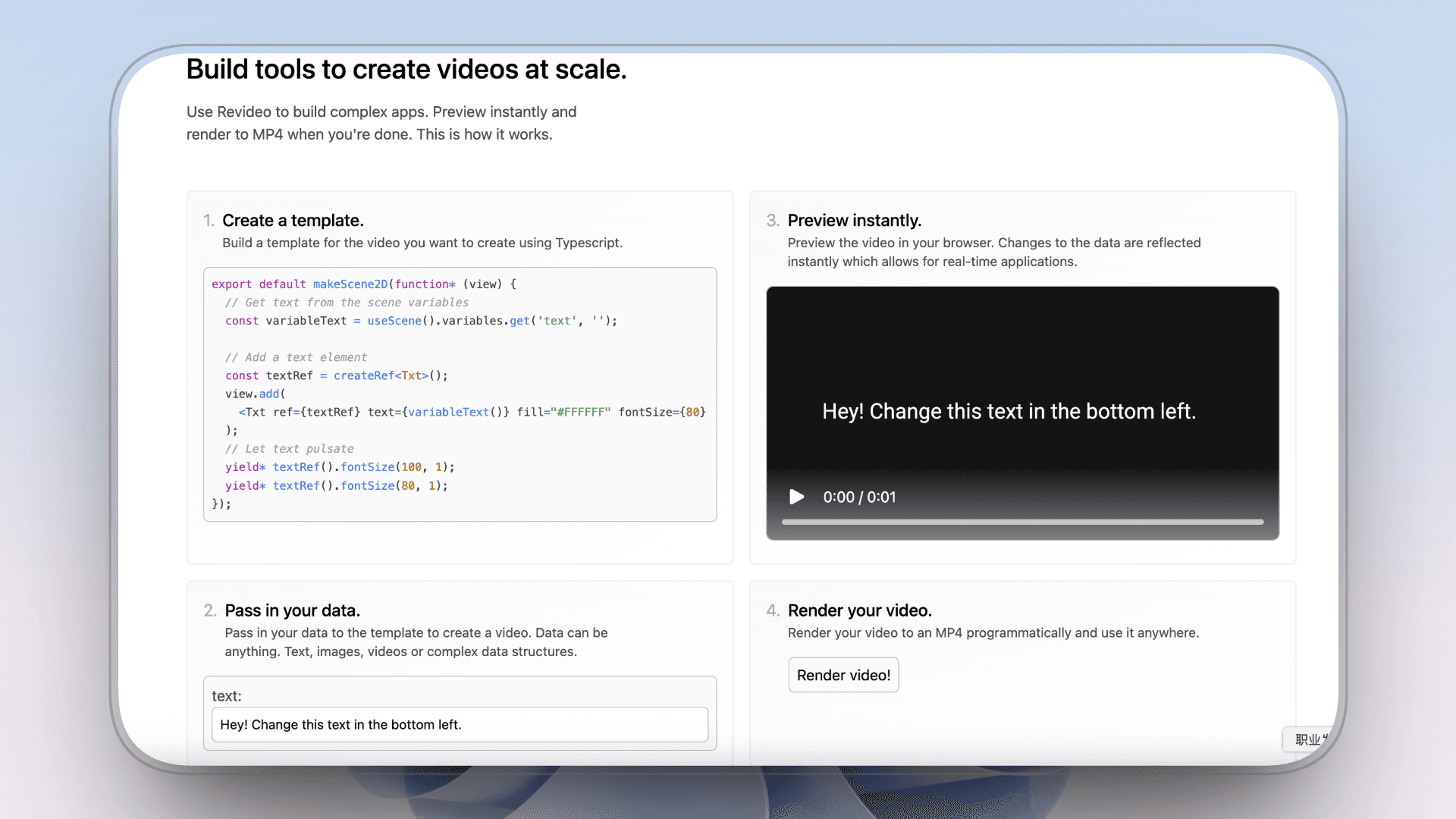
7 Remotion Alternatives in 2026: Code, API and No-Code Options
AI Tools Analysis July 19, 2026
Remotion now supports coding agents, Studio editing and programmatic rendering, but code remains the source of truth. This guide compares seven relevant alternatives for teams that want finished Motion Graphics, a different code framework, template automation or visual editing.
5 Open-Source Remotion Alternatives in 2026
AI Tools Analysis July 19, 2026
Remotion is source-available, not standard open source. Compare five MIT and Apache-2.0 alternatives by authoring model, rendering responsibility and the work still required after the license is free.
What Is a Lower Third? Sizes, Timing, and Real Examples
AI Tools Analysis July 19, 2026
A lower third is the text overlay in the bottom area of a video that names a speaker or adds context without blocking the shot. This guide skips the textbook definition and answers what editors actually ask: the exact size and safe area, how long a lower third should stay on screen, the four animation styles and when to use each, and where to get animated lower thirds without After Effects, with a real template you can watch.
VEED vs AutoAE (2026): One Edits, One Makes It Look Expensive
AI Tools Analysis July 3, 2026
VEED and AutoAE are not competing for the same job. VEED handles video editing, auto-captions, and now AI-generated video via VEED Motion (Fabric 1.0). AutoAE is a motion graphics snippet maker — hooks, animated titles, transitions — that takes 5 minutes and $2.90 per video. The article walks through 5 real creator scenarios, a full pricing comparison (AutoAE starts at $12/mo vs VEED at $18/mo), and makes the case that most serious creators end up using both tools in the same workflow.
HyperFrames Examples (2026): Real Compositions to Learn From
AI Tools Analysis July 3, 2026
The fastest way to understand HyperFrames is to look at what people actually build with it. This guide walks through real, public HyperFrames examples and use cases, from HeyGen's own open-source launch videos to automated pull-request walkthroughs and code demos, and explains what each one shows about the framework's strengths and limits. It also draws the honest line on what HyperFrames examples never include, generated footage, and points to the no-code path for teams who want the polished result without building the composition.
Is HyperFrames Free? Yes, With One Catch (2026)
AI Tools Analysis July 3, 2026
HyperFrames is free. HeyGen released it under the Apache 2.0 license, so it is free to use, modify, self-host, and ship commercially, with no per-render fees and no revenue thresholds. The catch is not a license fee but the real cost of running it: developer time to author each scene and compute to render. This guide explains the license in plain terms, what 'free' does and does not cover, how it contrasts with Remotion's paid business-source tiers, and the no-code alternative that prices the finished video instead of the toolkit.
AutoAE vs Hera AI (2026): Motion Quality and Editing
AI Tools Analysis July 3, 2026
AutoAE and Hera both create Motion Graphics for SaaS launches, UI animation and social video, but they begin from different production models. This comparison examines professionally designed visual models versus prompt-generated code animation, along with customization, visual range, Agent workflows and complete-video use. It also covers how each product fits SaaS launch videos, Viral Reels, YouTube videos, ads and projects assembled in an external editor.